A reverse bullet-hell roguelike with evolving weapons and choices that change the rules mid-run. I design and develop its gameplay, interface, and authoring tools in Unity.
Independent game · In development since January 2025
Role
Solo Developer
Status
In development
Technology
Unity · C#
Release target
PC · Planned for Steam
My contribution
Individual systems, one playable loop
ReapKeep is my largest independent project. I own the gameplay programming, game design, interface, and development tools, with a planned PC release on Steam.
A crowded run creates several connected problems: enemies need reusable lifecycles and readable movement, rewards need to remain manageable as pickups accumulate, and upgrades need to feed back into combat. These are the systems I built to connect that loop.
Game design
Structures give players a reason to explore
I use capturable structures to give players destinations and opportunities to reshape a run. Some builds can hold their ground; structures make venturing into the crowd valuable.
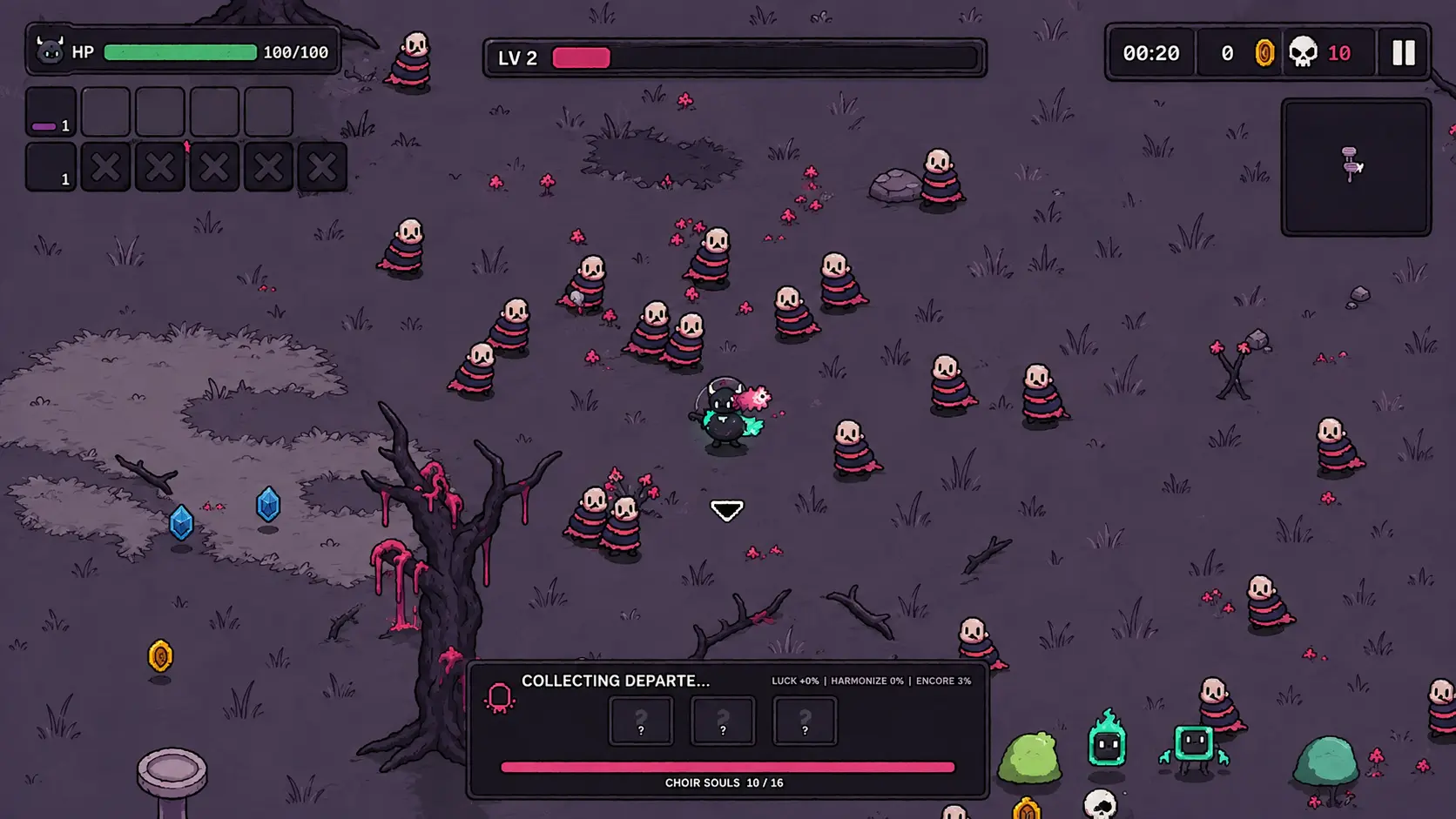
Development gameplay. Crowds, weapon effects, and rewards share the space the player travels through.
Death’s Decrees: choose a rule for the run
Capture milestones offer two eligible Decrees: advantages paired with changes to combat, movement, or the player’s build. The player can accept one or refuse. Up to four can be active; later milestones allow replacement or a blessing.
Decree offers occur on captures 1, 4, 7, and 10, then every third capture. Smaller blessings fill the gaps, keeping structures useful without asking for a major build decision every time.
That movement creates an engineering requirement: rewards should remain within reach as the player explores. The XP system below combines stored value and brings eligible offscreen gems back toward the player.
The connected game
From spawning to the next upgrade
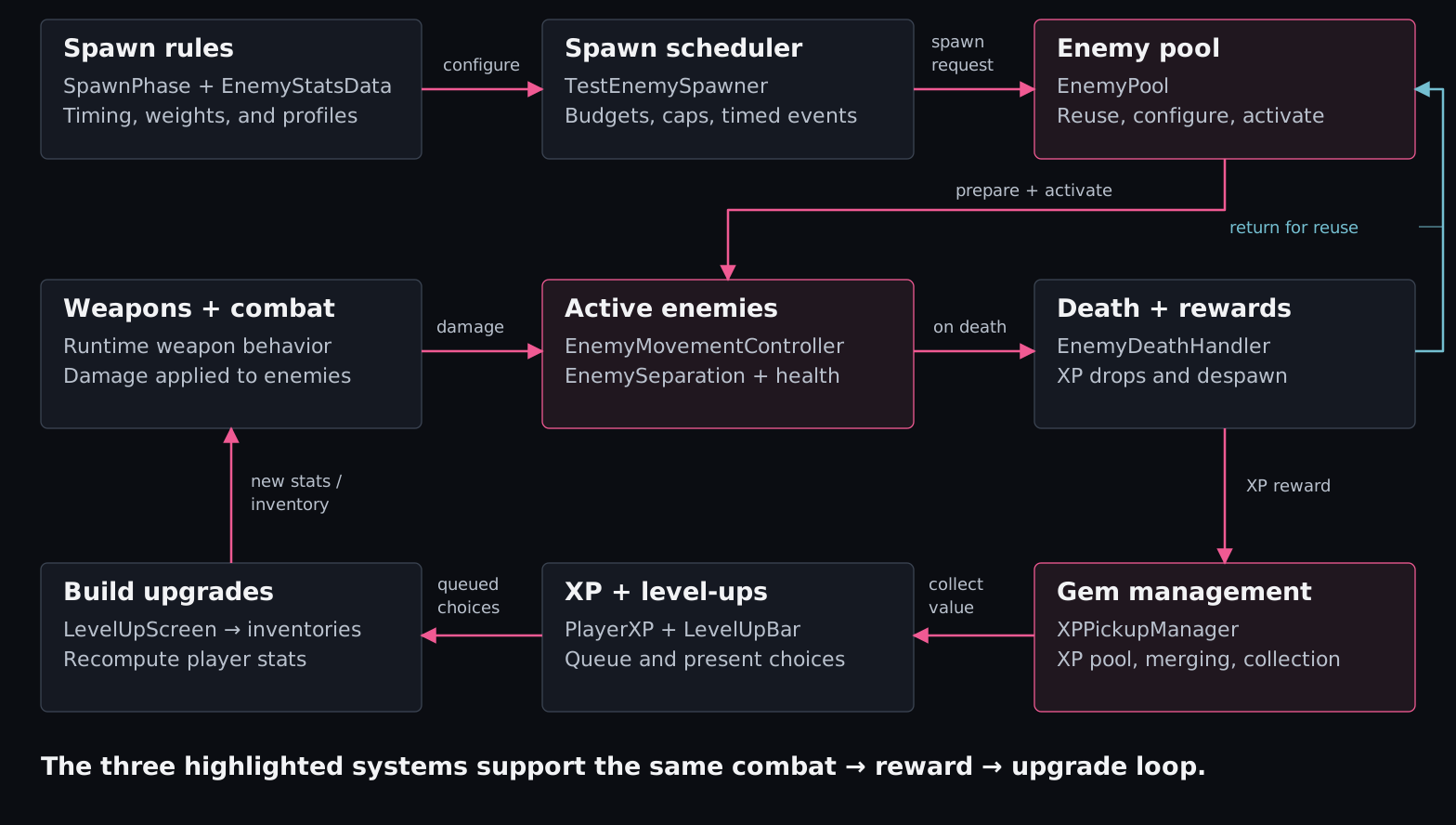
Spawn rules feed reusable enemies. Combat creates XP rewards, collected XP opens upgrade choices, and those choices change the player’s build.
The highlighted systems form the three walkthroughs below. Each manages a different part of the same run: enemy lifetimes, crowd movement, and reward objects.
01 · Object pooling
Reusable enemies, predictable resets
An enemy can leave behind changed visuals, movement state, or stats when it dies. The next spawn needs a prepared instance.
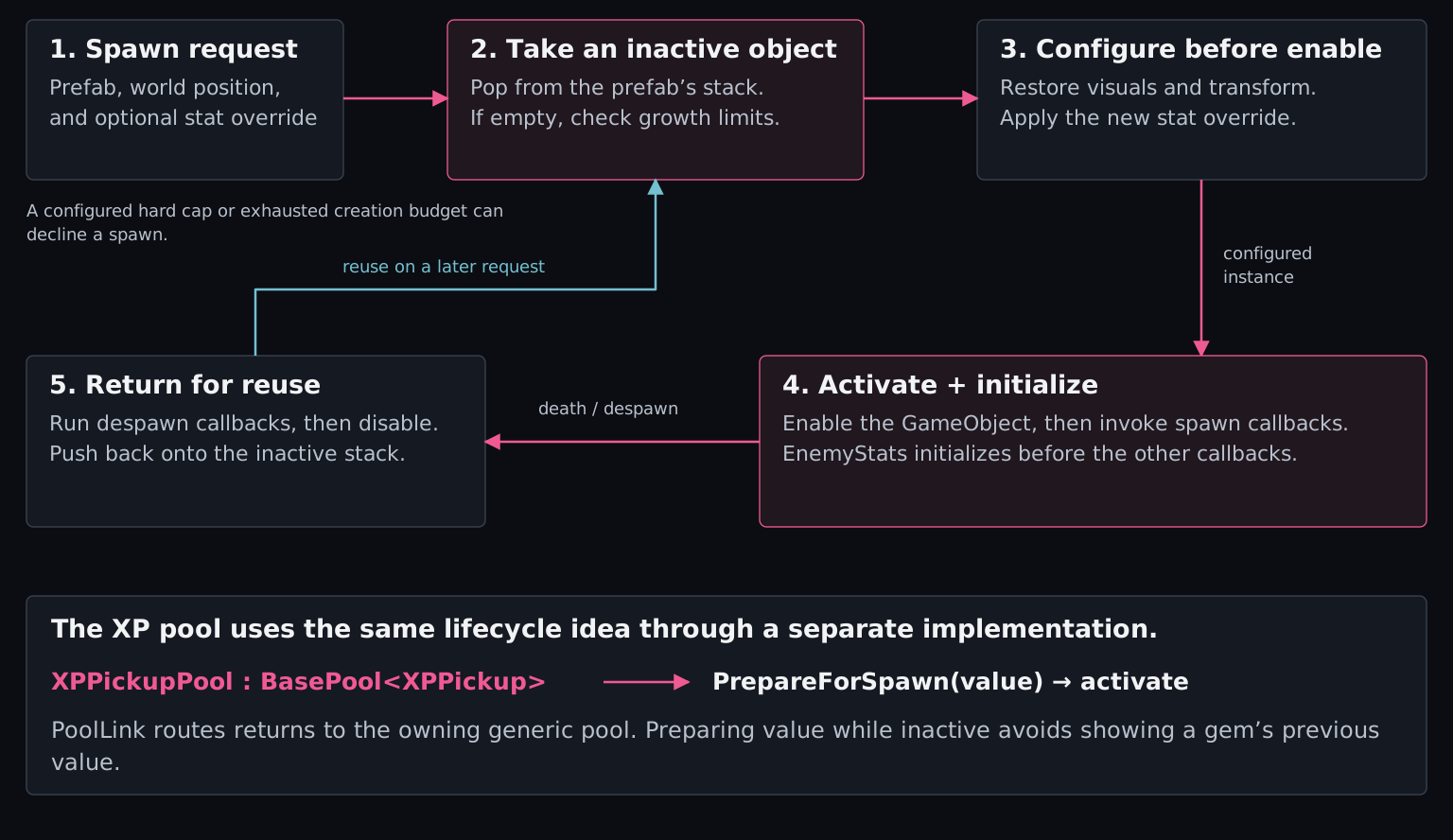
The enemy pool restores configured visual state, places the object, and applies an optional stat override while inactive. After activation, it initializes enemy stats before other pool callbacks. An active global freeze is applied afterward.
Reuse across the loop
Despawn callbacks clean up the current life before the object returns to its prefab’s stack. Reuse avoids creating a replacement for every spawn; configurable growth budgets limit new enemy creation in a frame. XP gems use a separate generic pool.
Implementation details and references
EnemyPool owns per-prefab inactive stacks and guards against duplicate returns. It is separate from BasePool<T>. The generic pool uses PoolLink for ownership and lifecycle callbacks; XPPickupPool.SpawnPrepared() prepares the gem’s value before enabling it.
Visual reset, prewarming, and caps are configurable. Ordinary spawn requests can be skipped when the enemy pool cannot supply an instance. Some other spawn callers have an Instantiate fallback, so this is not a claim that all object creation has been removed.
Enemy and grass frame players register with their respective animation managers. Each manager advances registered sprites on a shared, configurable timer, centralizing simple frame playback.
Spawn pressure with population limits
Phases control enemy types, spawn rates, and population targets. Soft thresholds reduce incoming pressure; optional overflow continues at a lower rate until the ordinary-enemy hard cap. Boss and special-event paths have explicit exceptions.
Animation and spawn-budget implementation
EnemyFramePlayer resets on enable and unregisters on disable. Its manager advances sprite frames; this does not mean every animation or object in the project uses that path. Grass has a separate manager.
SpawnPhase.maxAlive is a population target when continuous pressure is enabled, and a stopping limit when overflow is disabled. TestEnemySpawner also limits accumulated spawn credit, avoiding a large catch-up burst when the ordinary population cap opens. Bosses use a separate spawn path, and selected events use IgnoreAliveCap; the ordinary cap is not a universal ceiling on every enemy in the scene.
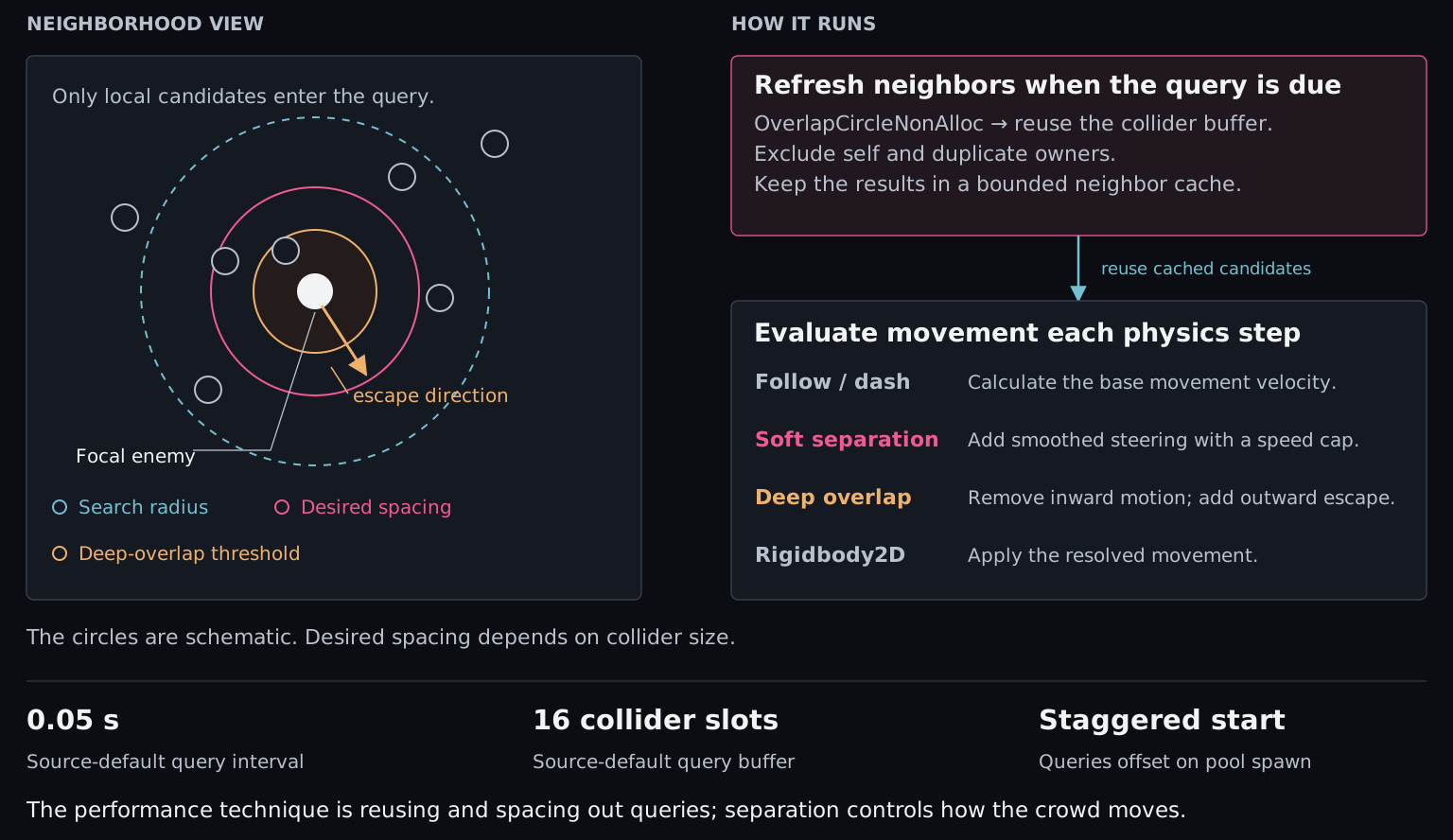
With a design built around hundreds of enemies, I needed crowd pressure and readable knockback without relying on physical collisions to push enemies apart.
Development reflection
My first approach used box-collider collisions to keep enemies apart. In crowded encounters, the amount of enemy-to-enemy contact caused severe slowdowns. I replaced that physical pushing with custom separation and code-controlled knockback, keeping the sense that enemies occupy space.
The difficult part was making the replacement feel right: enemies needed to yield to the crowd without erasing a weapon’s knockback. I gave the systems separate responsibilities. Separation corrects normal pursuit, while a knockback controller temporarily takes over movement during a hit reaction. That gave me direct control over spacing, escape, and shove distance.
Colliders still provide detection and body-size information. A non-allocating query fills a reusable buffer; filtered neighbors are cached between staggered refreshes. Code calculates the separation correction from those neighbors.
Separate soft steering from escape
Soft separation adds a smoothed, speed-limited correction to follow or dash movement. Deep overlap is handled afterward: remove movement further into the overlap, then add outward escape. That correction can temporarily move an enemy away from the player.
Separation, knockback, and query-budget details
The script defaults are a 0.05-second query interval and 16 collider slots. These are source defaults, not verified prefab settings. The limit applies to raw collider results; it does not guarantee the nearest 16 enemies. Buffers are allocated when absent or resized, then reused.
EnemyMovementController caches follow and dash behaviors and yields while isKnockedBack is set. EnemyKnockbackController interpolates a calculated displacement with Rigidbody2D.MovePosition() in a fixed-update state machine, rather than starting a coroutine for each hit. Resistance affects the shove, and pool callbacks clear its active state.
Despawning clears custom formation behavior, while separation clears its neighbor cache and resets query timing for the next life. The supplied scripts retain physics queries and Rigidbody movement; this is custom crowd response, not a physics-free implementation.
Enemies/PhysicsAndKnockback/EnemyKnockbackController.cs and KnockbackUtil.cs.
Enemies/Movement/Behaviors/FollowPlayerMovement.cs and DashPlayerMovement.cs.
03 · XP gems
Keeping rewards within reach
Structures encourage the player to travel. I wanted that exploration to coexist with a seemingly endless supply of XP, inspired by the reward feel of Vampire Survivors, while controlling pickup count and update work.
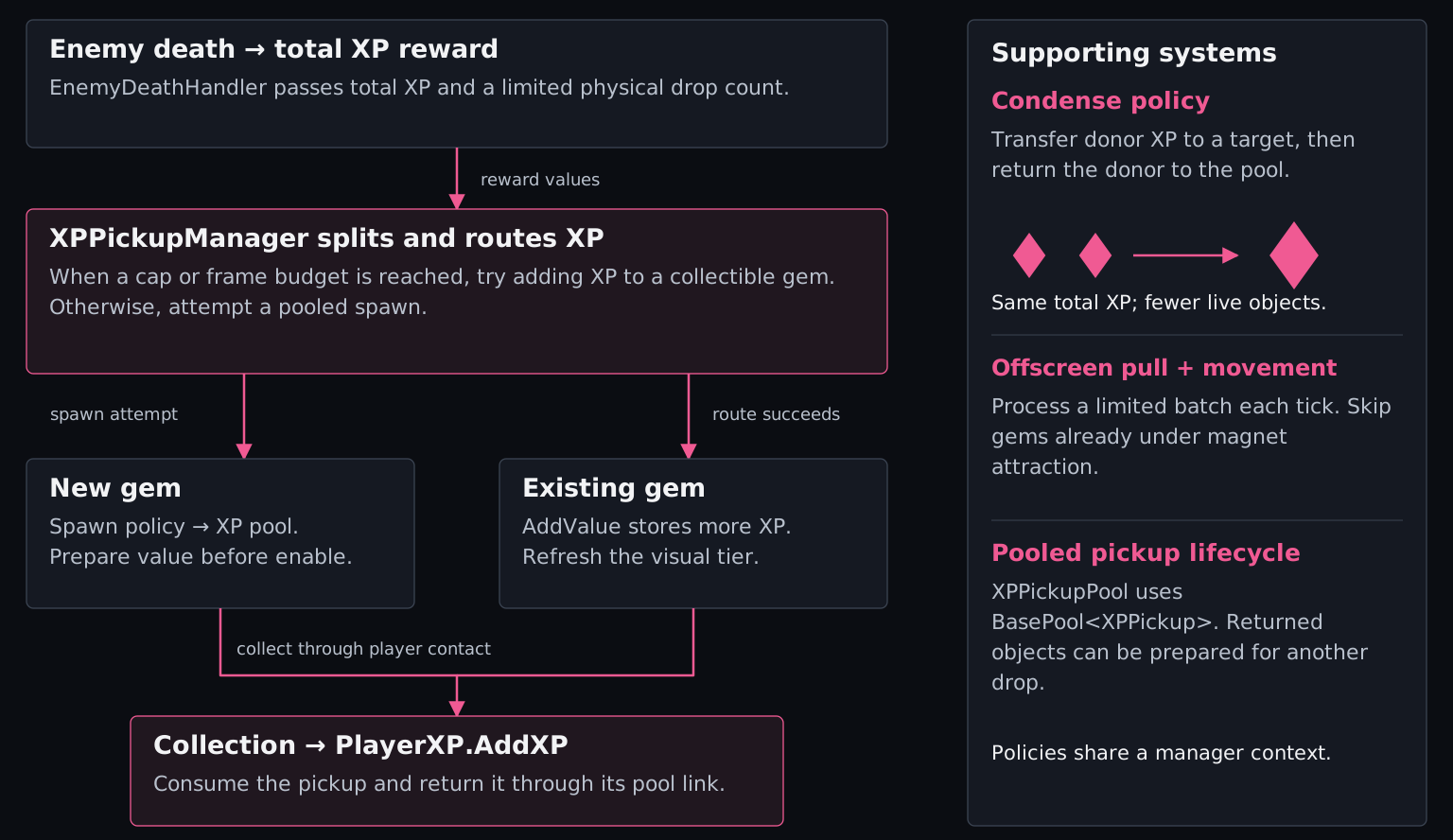
Enemy death separates total XP value from physical drop count. At a population threshold or per-frame spawn budget, new value can be routed into an existing collectible gem. Merging combines stored XP and returns the donor to its pool, so continued rewards do not require one new object for every drop.
Let rewards follow the journey
Eligible offscreen gems drift back toward the player’s area after a delay. A limited batch moves each tick, and gems already under magnet attraction are skipped. This supports exploration without requiring the player to constantly retrace their route for XP. Collection then feeds queued level-ups and build choices.
Movement eligibility, merging, and implementation details
Offscreen drift is gated by population, camera visibility, distance, and delay settings. A policy can target the player’s vicinity or the camera edge. It is separate from collection magnetism, so leaving the screen does not automatically award a gem’s XP.
Spawn, condensation, offscreen pull, and movement policies share an XPPickupManagerContext. The manager keeps a gem list with an index map and uses rotating or sampled searches for several operations. Cap-enforcement merging also includes full scans.
Value routing requires an eligible collectible gem. If routing fails, a pooled spawn may still be attempted; if both spawning and fallback routing fail, there is no deferred-XP queue in this path. Thresholds therefore coordinate work rather than guaranteeing an absolute object cap or value preservation in every configuration.
Enemies/Health/EnemyDeathHandler.cs — DropXP().
World/Pickups/Experience/XPPickupManager.cs and XPPickup.cs.
Systems/XP/Policies/Spawn/DefaultGemSpawnPolicy.cs and Systems/XP/Policies/Condense/DefaultGemCondensePolicy.cs.
Player/Progression/PlayerXP.cs — AddXP() and queued level-ups.
Builds & progression
The choices around the combat loop
These systems handle changes to the build, navigation during play, and the results carried into the next run.
Weapon evolutions
Authored recipes separate eligibility from replacement. Weapon + item, weapon + weapon, and character-specific starter routes share an evolution flow that coordinates the inventory change and records completion.
Recipe validation and deferred execution
WeaponEvolutionManager checks recipe requirements before asking the inventory to perform replacement. Automatic signature checks are deferred to the next Update() after an inventory-change event, with a re-entry guard. This avoids replacing the weapon inside that callback.
Consumed ingredients, level requirements, and character requirements belong to the recipe. The inventory validates the replacement; it does not provide a general rollback transaction.
The structure choices above feed a manager that validates offers, rebuilds modifiers, refreshes player and enemy state, and notifies the HUD. Existing enemies retain their health percentage when scaling changes; active Decrees reset for a new run.
How the change reaches active systems
Offers exclude active duplicates, incompatible groups, and irrelevant weapon doctrines. Granting or replacing a choice checks constraints again. Actor refreshes use direct calls; the HUD subscribes to ActiveDecreesChanged. Difficulty calculations separately read the current aggregated spawn and population modifiers.
Refreshing existing enemies uses a scene-wide lookup, which is a useful profiling target during crowded encounters.
The No Safe Ground example tracks actual player displacement, pauses its timers with gameplay, and reuses capped warning markers. Its movement bonus, hazard cadence, and tuning belong to the authored Decree.
Recalculation starts from authored values. Player-stat influence is blended using per-weapon weights before runtime item and Decree modifiers apply, so those later effects retain their intended strength.
Calculation order and extension points
The core path rebuilds damage, cooldown, and critical values from the level row, applies weighted player modifiers, then runtime item and weapon-doctrine effects. Bounds and weapon-specific hooks finish the pass. Adding a modifier requires choosing its place in this order.
A panel stack coordinates visibility, interaction, and focus. Opening Options from Pause can keep the underlying Pause panel in the stack, allowing the pause token to remain held until its condition is removed.
Scene configuration and prewarming
UIConfiguration defines allowed, default, and prewarmed panels. UIPrefabHub constructs panels inactive, and UIManager handles transitions and restoring the top panel. Prewarming and covered-panel behavior are configurable; hiding an active panel does not inherently stop all of its scripts.
Live counters and evolution flags reset for a new session. Run history, stage/difficulty clears, and discovered recipe knowledge have separate lifetimes. End-of-run guards prevent repeated finalization before results are presented.
What resets and what persists
GameManager asks ScoreManager to finalize the run. History stores the result and score breakdown; victories also record the selected stage/difficulty pair. Recipe discovery is stored separately from the flags for weapons evolved during the current run.
Run history and the profile are separate stores, not one atomic transaction. History has a retention limit, and explicit reset tools can clear saved records.
Authoring, validation, and repeatable inspection support the same systems used during play.
Weapon table importer
Separate validation and apply modes map CSV rows to weapon configurations and levels. Applying changes records Unity Undo state; blank cells can retain existing values.
Source and scope
WeaponS/Editor/WeaponStatsCsvImporter.cs. Validation covers supported input and mapping checks, not every possible balance issue.
Evolution route audit
A read-only editor window checks invalid references, duplicate recipes, reversed combinations, stable-ID collisions, and missing presentation assets. Findings can be selected in Unity or copied into a report.
A benchmark runner replays a shared seeded upgrade plan across difficulty passes and exports a CSV timeline of population, damage, progression, and frame-rate samples.
The plan controls upgrade choices, not the entire Unity simulation. Frame-rate samples are not percentile benchmarks; no measured FPS improvement is claimed in this case study.
Selected source
A closer look at the C#.
Animation pause cache. This small component shows how I cache Animator references, count overlapping pause requests, restore previous playback speeds, and clear state for pooled reuse.
This walkthrough combines my development experience, the v1.7 game design document, and selected paths in the September 2026 C# snapshot. The crowd-collision problem is a qualitative development observation; no before-and-after profiler measurements are presented. The diagrams explain the implementation. Scene/prefab configuration and runtime performance have not been independently verified for this case study.
Other systems include world generation, character abilities, audio, and composable achievement rules. The full game source remains private; the animation-pause sample above contains two selected source files.
In development · Technical walkthrough updated September 2026